Showing posts with label ruby-on-rails. Show all posts

22 September 2016

State of Rails Releases

I am dealing with multiple Rails applications at once some of which are funded right and some of which have ran into maintenance modes. I just wanted to have a pictorial representation of what is the state of each of the Rails versions, unfortunately, I cannot get one. So I spent half an hour trying to decode the Rails official releases page and came up with this.


If you closely observe, the Rails releases 3.0.x and 3.1.x are history (I don't even want to pull up data for releases before that). It is high time you plan to upgrade your stack to a minimum of Rails 4.2 before you loose all the goodness the Rails community has to offer. Yes, I know it is a herculean task for folks in 3.x in which case I recommend you to do a complete rewrite of your application piecemeal by piecemeal!

Data Source: http://weblog.rubyonrails.org/releases/

Cheers,
Braga

21 November 2015

Cloning remote PG database and loading in Local environment


For projects involving small to medium sized databases one may require to copy the remote (or production) database onto local environment. I was earlier doing this for my production application using custom pg_dump and then restoring with pg_restore. It was relatively straightforward but still consumed good amount of time. I wanted to automate this using capistrano and this is how I did it

You should note that this is extremely fast because it executes the command on the VPS - usually EC2 which has amazing internet speeds. And then copies it over scp as a single file. You can also add a compression step using the --format option in the pg_dump.

Hope this was helpful!

Cheers!
Braga

08 August 2015

Ransack namespace collision - The search method

I am a big fan of Ransack, the Rails gem for quickly building a quick and easy Search based on pure ActiveRecord queries. For projects that require some on the fly search without having to set up dedicated Search Engines like Elastic Search, SOLR, ThinkinSphinx - this is a very juicy alternative.

However I recently faced one problem when I introduced this to a project where there already was SOLR integrated. It was because of the collision of the search method.

This simply patch did the job for me. All you have to do is include it to your initializers folder say under config/initializers/ransack.rb

That's it, the Ransack library will no longer collide with your existing suite. As a matter of fact the method search deprecated already and the library itself wants us to use the Alias ransack

Cheers!
Braga

27 February 2012

Rails script/generate model with an association

I know this blog has been dormant for quite some days now for no apparent reason. But I would like to share what I learnt today. This is going to be in Rails (2.3.x) and hardly interest anyone who already knows it. But it still was a learning to me. I use to hate working in command prompt and was an IDE freak, a real good one too. But I was cornered to learn more on the command line front as well. Why waste an extra feather in the cap?
Bulling the shit, here is what I learnt today.

Rails has a script/generate ready for many usual stuff that we do. One of them is the model generator. It is not that much, but I was wondering whether it is possible to create associations using it. And I found it is not.

I tried a stupid model generation something like (in fact exactly like this)

rails -d mysql playground
cd playground
script/generate model project name:string has_many:tasks

It reeked,
exists  app/models/
exists  test/unit/
exists  test/fixtures/
create  app/models/project.rb
create  test/unit/project_test.rb
create  test/fixtures/projects.yml
create  db/migrate
create  db/migrate/20120227204200_create_projects.rb

My stupid assumption was that it would actually create a couple of models called projects and tasks. But to my wonder, it did not. The highlight was this command did not even raise any error. Inspecting the database migration, I found

class CreateProjects < ActiveRecord::Migration
  def self.up
    create_table :projects do |t|
      t.string :name
      t.tasks :has_many

      t.timestamps
    end
  end

  def self.down
    drop_table :projects
  end
end

And I did a migration and it did migrate without any errors. It silently ignored the line t.tasks :has_many. Not usual right?! But this is rails, you got to adapt and adapt very well. One more learning probably I could share are the commands that come with the script/generate model is the --pretend. This is like a dry run, does not actually creates a physical file but tells what its going to do. Thats it for today.

Cheers!
Braga

06 June 2010

Hello World in Ruby

After getting a decent knowledge of what Ruby is and the useful resources that are available, lets get into action by creating our first hello world program.

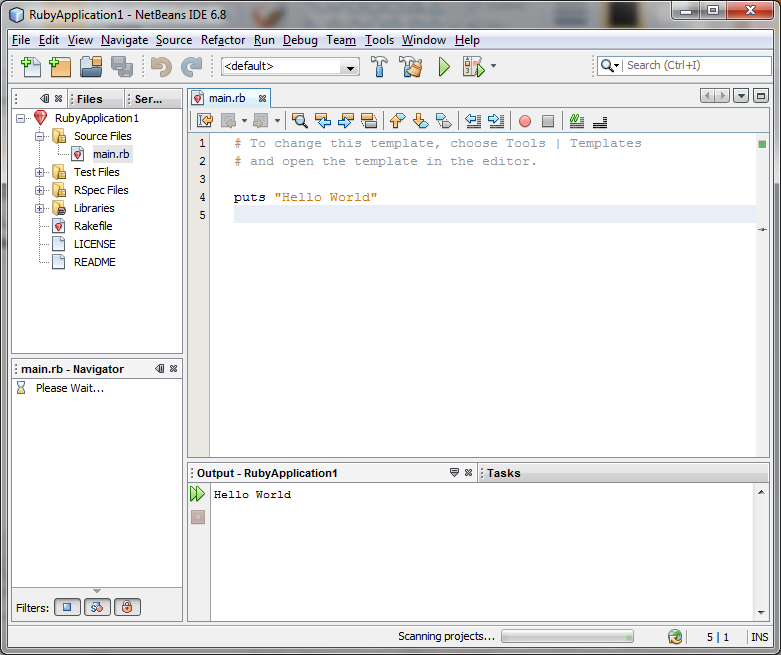
Ruby and Ruby on Rails development becomes amazingly easy using Netbeans IDE where you can perform almost all the tasks in one single IDE. Download and install the Netbeans-Ruby version. You should be having JDK installed in your box, thats pretty much the pre-requisite for Netbeans to install.


Once your installation is done, launch Netbeans go to File --> New Project. A new project wizard should come up. Select Ruby Application, click Next and click Finish. Thats it!!!! You dont even have to type a Hello World. The new project template does it for you! So sweet isnt it? Now, click on the big green Run button and the console should print out Hello World without a hitch.


Way to go!! We shall try out some simple programs in the coming posts.

Cheers!
Bragaadeesh.

04 June 2010

Useful books on Ruby and Ruby on Rails

Before we jump into the real discussion on Ruby and Ruby on Rails, I felt it will be nicer if I could provide some of the very good books available out there. Programming Ruby 1.9 is the starter pack that everyone who is willing to work on Ruby has to go through.

  • Agile Web Development using Rails 3rd Edition 
  • Programming Ruby 1.9
  • Head First Rails


Cheers!
Bragaadeesh.